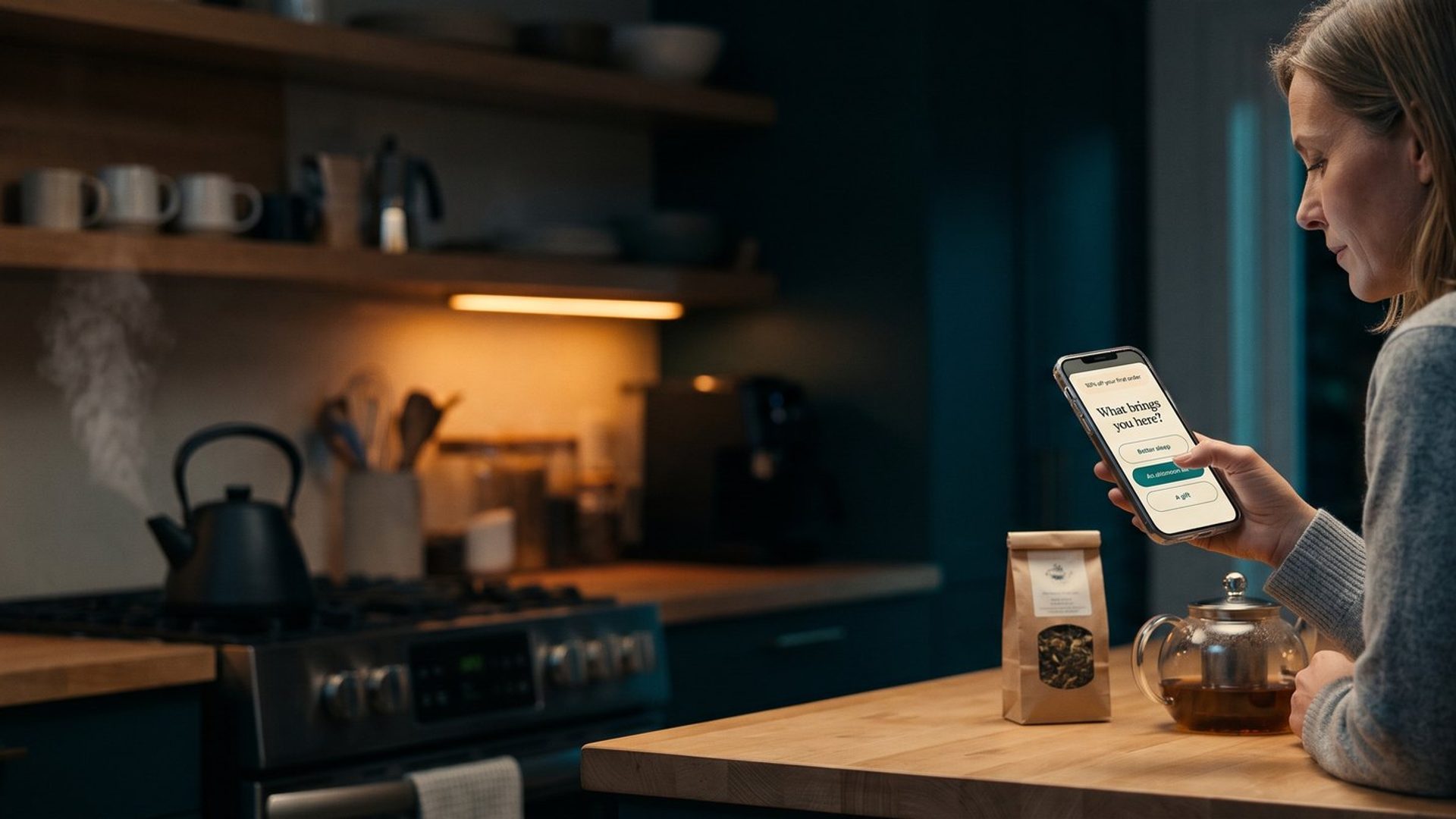
Most online stores have a popup. It slides in a few seconds after someone lands, offers ten percent off, asks for an email address, and hands over a code. The shopper types their email, grabs the discount, and from that moment on they get exactly the same welcome emails as everyone else who ever filled in that box.
The store now knows one thing about that person: where to send email. It does not know what they came for, who they are buying for, or whether they have ever used a product like yours before. And it had the shopper's full attention, at the most interested moment of their whole relationship with the store, and asked them nothing.
That gap has a name. Zero-party data is information a customer tells you on purpose: their goal, their problem, who the purchase is for, what matters to them when they choose. It is shared knowingly, in the customer's own choice of answer, and that makes it different from everything else your store collects, because everything else is something you watched them do.
This piece is about the cheapest way to start collecting it: one question on the signup form you already have, saved where your email platform can use it, and then read properly.
Your Store Knows What Shoppers Clicked. It Has No Idea Why They Came.
Almost everything a store knows about its customers is inferred. Your ad platforms see clicks and page views and guess at interests. Your email platform sees opens and clicks and guesses at engagement. Your store sees orders and knows what was bought, when, and for how much.
That last group, your order history, is genuinely valuable. It is your own data and nobody can take it away. But notice what it describes. It tells you what happened. It never tells you why. A customer who bought a sampler of chamomile and lavender tea might be fighting insomnia, might be cutting back on caffeine, or might have bought it for their mother. Those are three different people who need three different follow-up emails, and the order record looks identical for all of them.
The guessing has also been getting worse. Since September 2021, Apple Mail Privacy Protection has preloaded email images, including the tiny tracking pixel that records an open, so a large share of "opens" now happen whether or not a person ever read anything. Klaviyo's own help center warns that it inflates open rates and makes it harder to spot the subscribers who are really engaged. On the ad side, iPhone apps have had to ask permission before tracking people across other apps since the same year, and many people say no. The behavioral signals you used to guess from are noisier than they were, and they are not coming back.
Declared answers do not have that problem. Nobody preloads a multiple-choice question. When a shopper taps "I'm shopping for a gift," they told you, knowingly, on your own site.
We have written before about the product-finder quiz, which collects this kind of answer as a side effect of recommending the right product (the quiz post is here). A quiz is a real project, and it only earns its keep for stores with a wide or confusing range. The signup form is different. Every store already has one, it already gets traffic, and adding one question to it is an afternoon of work.
A Question Earns Its Place on the Form When Every Answer Changes What You Send
The easiest mistake here is to ask something interesting instead of something useful. "What's your favorite color?" is interesting. It will produce a lovely pie chart. Unless you sell paint, you will never do anything differently because of it.
So run every candidate question through one test before it goes on the form: for each possible answer, what will I do differently? If every answer leads to a different email, a different product shown first, a different line in an ad, the question earns its place. If two of the answers would get the same treatment, merge them. If none of them change anything, cut the question entirely.
Questions that usually pass that test for a small store:
- Who is it for? Yourself, someone else, or both. Gift buyers need different emails, different timing, and often a different offer.
- What are you hoping it does? The main goal or problem. For our tea shop: better sleep, an afternoon lift without coffee, or something to share.
- How familiar are you with this? New to it, have tried a few, or a regular. A beginner needs an explanation. A regular finds explanations patronizing.
- What are you shopping for today? Useful when you sell distinct categories (a pet store with dog, cat, and small-animal ranges).
Questions that usually fail: age, income, budget, and anything a person would hesitate to say to a stranger at a counter. They add friction, they feel nosy on a discount popup, and most stores have no plan for the answers.
A few practical rules from the sources we read, all of which match what we see in accounts:
- One question to start, two at most. Each extra question costs you some signups. You can always ask more later, in an email, once someone trusts you.
- Two to four answers, written in the shopper's words. "Better sleep" beats "relaxation-support blends."
- Make it a tap, not a typed box. Buttons or radio choices. Open-text answers are wonderful in a survey and useless for routing emails, because nobody types the same thing twice.
- Ask before or after the email field, then check which converts better. Some stores put the question first as a small commitment that makes the email step easier. Others take the email first so a shopper who quits at the question still joins the list. There is no universal winner. Watch your signup rate for two weeks after you add it.
That last point raises the fair worry: will an extra question kill signups? The email agencies we read (Mike Alexandrov and Nicolas Olaya both run Klaviyo work for stores) report that popups with a question often convert better, not worse, because a shopper sees something other than the same discount box on every site. Treat that as their experience, not a law, and measure your own. Even if you lose a few signups, a smaller list you can actually speak to usually earns more than a bigger one you cannot.
An Answer You Never Saved to the Customer's Profile Is Just a Click
Here is where most stores that try this quietly fail. They add a question to the popup, shoppers answer it, and the answer goes nowhere. It sits in a form report nobody opens, attached to nothing, and the welcome emails keep going out exactly as before.
The answer has to be saved on the subscriber's profile in your email platform, as a field you can filter on. Then every flow, segment, and campaign can use it.
In Klaviyo, signup forms support radio-button fields, and each one is set to collect a profile property that you name yourself, such as "shopping_for" or "main_goal." Whatever the shopper picks is written onto their profile. Inside a flow, a conditional split can then send people down different paths based on that property, and Klaviyo has been rolling out multi-branch splits that route up to 19 different conditions from a single step, plus an "everyone else" path. If you run Shopify Email, Shopify's free Forms app can add new subscribers with customer tags and supports custom metafields, which does the same job: the answer lives on the customer record where your automations can see it. Other email platforms have their own version of a custom field. The names differ. The principle does not.
Before you trust any of it, test it yourself. Open your store in a private browser window, trigger the popup, pick an answer, and sign up with an email address you control. Then find that profile in your email platform and look for the answer. If it is not on the profile, nothing downstream will work, and you will spend three months wondering why the split flow never splits.
Your Welcome Emails Are Written for an Average Shopper Who Doesn't Exist
Think about who your current welcome series is written for. It is written for everybody, which in practice means it is written for an imaginary average subscriber: part beginner, part enthusiast, part gift buyer, part bargain hunter. The first email introduces the brand to someone who might already know it. The second recommends best sellers to someone who might be shopping for their sister. The beginner gets jargon. The regular gets an explanation of what they have been buying for years.
Andres Ocampo, who builds email programs for larger online brands, puts it bluntly: a single welcome flow is "talking to a person who doesn't even exist." Every subscriber is a real person who told you, or could have told you, what they wanted. The averaged message is a compromise that fits none of them well.
The good news is that you do not need three complete welcome series to fix it. That is the trap that stops small stores from ever starting, because writing fifteen emails instead of five sounds like a month of work. Here is the version a small team can actually build:
- Split only the first one or two emails. Email one is where the answer matters most. It is the one that says "you told us you sleep badly, so start with these," and recommends the two or three products that fit that answer.
- Merge everyone back for the rest. Your brand story, your reviews, and your guarantee are the same for everybody. Those emails can stay shared.
- Use the answer in the words, not just the product grid. "You said you're shopping for a gift" lands differently than a generic subject line. It proves you listened, which is most of the point.
- Keep an "everyone else" path. Some people will skip the question or sign up through another form. They get your current welcome email, unchanged.
For the tea shop, that is three versions of email one and possibly email two, plus the shared emails it already had. A day of writing, not a month. If you want to see how the welcome series fits alongside the other automated emails a store should be running, we walked through all five in Your Store Sends One Automated Email. It Should Be Sending Five.
Shoppers Who Pick the Most Popular Answer Are Rarely Your Biggest Spenders
This is the part almost nobody does, and it is the reason we would push a store to add the question even if the split emails did nothing at all.
After about ninety days, put the answers next to the money. For each answer, count the subscribers who picked it, then add up what those subscribers have spent since they joined. Divide the spending by the number of subscribers and you get revenue per subscriber for each group. Most email platforms can show this directly, because the answer is a profile property and revenue is attached to the profile. If yours cannot, export the subscriber list with the answer field, export orders by customer email, and match them in a spreadsheet.
Marko Mandic, who teaches conversion work for online stores, describes the moment this usually produces. One answer is the clear favorite, picked by something like seven in ten people, and the natural instinct is to build everything around it: the ads, the landing pages, the emails. Then you look at the spending, and one of the smaller answers turns out to spend roughly three times as much per customer. Your acquisition, he points out, has been aimed at the wrong group the whole time. His numbers are an illustration, not a study, but the pattern is one we recognize.
Here is what it looks like for our tea shop, using illustrative numbers for 1,000 subscribers over their first 90 days:
Sleep is by far the most common reason people sign up. It is also the group that spends least, because sleep tea is a calm, occasional purchase. The afternoon-lift group is a quarter of the list and spends almost three times as much per person, because a daily caffeine habit reorders every few weeks. The gift group is small but buys big baskets.
That one table changes real decisions:
- Where the ad money goes. If the store's ads all lead with sleep, it is buying the cheapest customers it has. Testing ads that lead with the coffee swap is now an obvious next move.
- What the homepage leads with. The first collection a new visitor sees can favor the group that is worth the most, not the group that is most common.
- What a customer is worth paying for. Each group can carry a different ceiling on what you will spend to acquire it, which is the margin math from our piece on break-even ROAS applied one group at a time.
Ocampo reports something similar from the other direction. For a golf equipment brand, his team sent an email only to the roughly ten percent of the list that had answered a popup question about their game, and that small send made more than the regular email to the whole rest of the list. That is an agency's account of its own work, so weigh it accordingly, but the mechanism is easy to believe: a message written for a known person beats a message written for a crowd.
One caution. Ninety days and a few hundred subscribers per answer is the point where these numbers start to mean something. Twelve people per group is noise. If your list grows slowly, give it longer before you move budget, and treat the first read as a direction to test, not a verdict.
Your Signup Answers Already Wrote Your Next Ad. Most Stores Never Read Them.
Once the answers are on profiles, they stop being an email trick and become research you did not have to pay for.
They write your ad angles. A shopper who picks "an afternoon lift without coffee" has just handed you the opening line of an ad, in the customer's own words. Count which answers are most common among your best spenders and you know which promise to lead with. Olaya makes the same point with a simple example: if most of the people who sign up say long-lasting results are what they care about, the ads should lead with durability, not with the ingredient list.
They build better audiences. A segment of high-spending subscribers who all gave the same answer is a strong seed for a customer list in Google Ads or Meta, much stronger than "everyone who ever bought." We covered how to upload and use one in Your Customer List Is the Best Audience You Can Give Google Ads. Upload only people who agreed to marketing, and keep the list current.
They fix your product pages. If a third of your signups are buying for someone else, your product pages should answer gift questions without making anyone hunt: gift notes, delivery dates, what is in the box, how easy a return is for the recipient.
They tell you what to stock. Add an "other" option to one question and read what people write in. Olaya's example is a skincare store whose subscribers keep naming the lack of a fragrance-free option as a concern: once enough of them say it, the store has a reason to make one that it did not have to guess at. That is the cheapest product research a small store will ever get.
Gift Buyers Hide in Your Order List. One Question After Checkout Finds Them.
The signup form catches people before they buy. A second question, after checkout, catches the buyers who never joined your list, and it is where some of the most surprising answers turn up.
Connor Gross, who ran a seven-figure Amazon brand before building stores on Shopify, added a two-question post-purchase survey to his store using a survey app that cost him about five dollars a month. The first question was simply whether the shopper was buying for themselves or as a gift. He expected a small holiday bump. Over half of his buyers said it was a gift.
Every ad, email, and product page he had was written for the person who would use the product. More than half of his customers were someone else entirely: the person choosing it for them. He changed his copy to speak to the gift buyer, put more of his ad budget behind the big gift-giving seasons, and started offering gift wrap and thank-you notes as add-ons.
That is the same lesson as the signup question, reached from the other side of the order. Your buyers and your users are not always the same people, and nothing in your order history will tell you which is which.
Post-purchase survey tools for Shopify range from cheap single-question apps to full survey platforms with reporting. Two habits matter more than the tool: keep it to one or two questions, and make sure the answer is saved to the customer record, exactly as with the signup form. If you also want to ask buyers what almost stopped them from ordering, that question is about fixing your store rather than segmenting your email, and we covered how to use it in Your Analytics Show Where People Leave. They Can't Tell You Why.
One Question on Your Signup Form Is an Afternoon of Work, Not a Software Project
None of this needs a new app, a data team, or a rebuild. Do it in this order:
- Write one question. Two to four answers, each passing the "what will I do differently" test. If you are stuck, start with "Who are you shopping for?" It works for almost every store.
- Save it to the profile. Add it to your existing signup form as tappable choices that write to a named field. Then sign up yourself and confirm the answer is on your profile.
- Split email one. Write one version of your first welcome email per answer, plus the unchanged version for everyone else. Leave the rest of the series alone for now.
- Put a date in your calendar 90 days out. Pull revenue per subscriber by answer. That is the day you find out who your best customers really are.
- Then add the question after checkout. Once the signup question is working, ask buyers who the order was for.
The cost is a few hours. The payoff is that your store stops guessing about the one thing its tracking can never tell it: why people came.
This is the kind of work we do every week when we look at online stores whose ads are bringing in plenty of signups that never turn into customers. If you would like someone to look at where yours is losing them, we are happy to help. Either way, add the question. Your shoppers have been ready to tell you what they want for a long time. Nobody asked.